DColorCube:SetColor
Örnek
Ekranın orta pikselindeki rengi seçer ve bir renk küpünün temel rengine uyguluyor.
function makeCMenuPicker() -- element oluşturmak
local c_w, c_h = ScrW()/2, ScrH()/2
PickerPanel = vgui.Create("DPanel", g_ContextMenu) -- C menüsüne bağlı tembel (sandbox + türevler), normalde DFrame kullanırdınız.
PickerPanel:SetSize(120, 120)
PickerPanel:SetPos( c_w-60, c_h-150 )
local color_cube = vgui.Create("DColorCube", PickerPanel) -- Renk küpü
color_cube:Dock(FILL)
color_cube:DockMargin(15, 15, 15, 0)
PickerPanel.cube = color_cube
local color_label = vgui.Create("DLabel", PickerPanel)
color_label:Dock(BOTTOM)
color_label:SetContentAlignment(5)
PickerPanel.label = color_label
end
hook.Add("InitPostEntity", "create_colorpicker_vgui", function() makeCMenuPicker() end)
local function updateCube() -- öğeyi güncelleme
if !IsValid(PickerPanel) then return end
hook.Add("PostRender", "capture_center_pixel", function()
render.CapturePixels() -- o pikselleri yakalayın!
local p_r, p_g, p_b = render.ReadPixel(ScrW()/2, ScrH()/2) -- Ekranın ortasındaki pikselin rengini alın
local to_color = Color(p_r, p_g, p_b)
PickerPanel:SetBackgroundColor(to_color)
PickerPanel.cube:SetColor(to_color) -- Rengi merkezi piksel rengine ayarlayın
PickerPanel.label:SetText(tostring(to_color))
local c, b, va = ColorToHSV(to_color)
if va > 0.6 then -- parlaklığı kontrol edin ve çok aydınlıksa siyah ayarlayın.
PickerPanel.label:SetTextColor(color_black)
end
hook.Remove("PostRender", "capture_center_pixel")
end)
end
hook.Add("OnContextMenuOpen", "capture_on_context_open", function() updateCube() end) -- C menüsünün açılışında güncelle!
Çıkış: 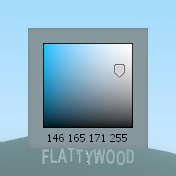
Tüm sunucular · GmodTR Launcher · Rehber · GMod Wiki · GmodTR nedir? · Sunucu ekle · Discord