Panel:InsertColorChange
Örnek
Metnin belirli bölümlerinde renk kodlaması olan bir RichText paneli oluşturur.
-- Bir pencere çerçevesi oluştur
TextFrame = vgui.Create( "DFrame" )
TextFrame:SetSize( 200, 200 )
TextFrame:Center()
TextFrame:SetTitle( "Colored text" )
TextFrame:MakePopup()
-- RichText paneli
local richtext = vgui.Create( "RichText", TextFrame )
richtext:Dock( FILL )
richtext:SetVerticalScrollbarEnabled( false )
-- Metin blokları
richtext:InsertColorChange( 255, 255, 192, 255 )
richtext:AppendText( "This is an example of " )
richtext:InsertColorChange( 0, 255, 0, 255 )
richtext:AppendText( "color coding " )
richtext:InsertColorChange( 255, 255, 192, 255 )
richtext:AppendText( "different segments of text throughout a " )
richtext:InsertColorChange( 255, 200, 0, 255 )
richtext:AppendText( "Rich Text panel.\n\n" )
richtext:InsertColorChange(64, 0, 255, 255 )
richtext:AppendText( "Here is another line of text shown in the color ")
richtext:InsertColorChange( 128, 0, 255, 255 )
richtext:AppendText( "purple." )
-- Panel yerleşime hazır olduğunda, yazı tipini ve arka plan rengini uygula
function richtext:PerformLayout()
self:SetFontInternal( "Trebuchet18" )
self:SetBGColor( Color( 0, 16, 32 ) )
end
Çıktı: 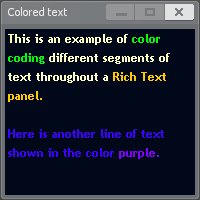
Örnek
string.Explode ve rastgele renkler kullanarak kelime kelime renklendirme.
-- Bir pencere çerçevesi oluştur
local TextFrame = vgui.Create( "DFrame" )
TextFrame:SetSize( 300, 200 )
TextFrame:Center()
TextFrame:SetTitle( "Randomly Colored Words" )
TextFrame:MakePopup()
-- RichText paneli
local richtext = vgui.Create( "RichText", TextFrame )
richtext:Dock( FILL )
richtext:SetVerticalScrollbarEnabled( false )
local txt = {
"Here's a fun example involving word by word text coloring.",
"Each word is separated by a space, colored, and appended to the Rich Text panel individually.",
"The colors are randomly generated shades of red, orange, yellow, and pink."
}
local txt_tbl = string.Explode( " ", txt, false )
for _, word in ipairs( txt_tbl ) do
richtext:InsertColorChange( 255, math.random( 0, 255 ), math.random( 0, 255 ), 255 )
richtext:AppendText( word .. " " )
end
function richtext:PerformLayout()
self:SetFontInternal( "GModNotify" )
self:SetBGColor( Color( 32, 16, 0 ) )
end
Çıktı: 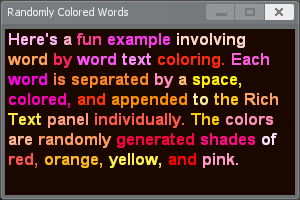
Tüm sunucular · GmodTR Launcher · Rehber · GMod Wiki · GmodTR nedir? · Sunucu ekle · Discord