Araç Bilgi Görüntüleme
This page describes how to use TOOL.Information.
You can find source code for it here.
Here's an example:
if CLIENT then
TOOL.Information = {
{ name = "info", stage = 1 },
{ name = "left" },
{ name = "right" },
{ name = "right_use", icon2 = "gui/e.png" },
{ name = "reload" },
{ name = "reload_use", icon2 = "gui/e.png" },
}
language.Add( "tool.example.1", "See information in the context menu" )
language.Add( "tool.example.left", "Select an object" )
language.Add( "tool.example.right", "Select next mode" )
language.Add( "tool.example.right_use", "Select previous mode" )
language.Add( "tool.example.reload", "Select yourself" )
language.Add( "tool.example.reload_use", "Select your view model" )
end
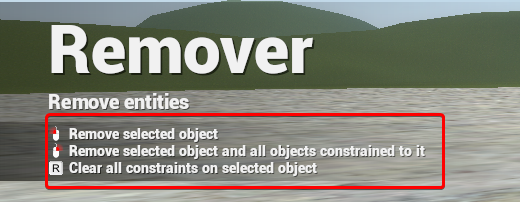
For each table inside the TOOL.Information a new line of text is added to the Tools help HUD.
Key explanations
name- Overrides the localization string to#tool.<toolclassname>.<name>(<toolclassname>is the filename of your tool)- Default value is
info, which will displaytool.<toolclassname>.<toolstage>, like all tools that do not useTOOL.Informationdo.
- Default value is
icon- A path to the first iconicon2- A second icon path, for key combination iconsstage- Makes the text only appear for given stage ( Tool:SetStage )op- Makes the text only appear for given operation ( Tool:SetOperation )
Default icon fallbacks
Certain names have a default fallback icons:
- If your
nameends onuseand you do not override theicon2,icon2will be E key. (gui/e.png) - If your
namestarts withinfo- default icon isgui/info - If your
namestarts withleft- default icon is LMB icon (gui/lmb.png) - If your
namestarts withright- default icon is RMB icon (gui/rmb.png) - If your
namestarts withreload- default icon is R key icon (gui/r.png)
To change what the screen on the ToolGun model looks like - see TOOL:DrawToolScreen
Tüm sunucular · GmodTR Launcher · Rehber · GMod Wiki · GmodTR nedir? · Sunucu ekle · Discord